Relieving Tech Neck Tightness in the Neck
Are you tired of dealing with the discomfort and pain associated with tech neck? Prolonged periods of screen time can lead to a condition known as tech neck, also referred to as forward head posture or cervical hyperkyphosis.
The Risks of Tech Neck
When you spend excessive time staring at screens, it can cause your neck muscles to become strained, leading to pain, stiffness, and decreased mobility. This condition can also exacerbate existing neck issues, such as herniated discs, arthritis, and related migraines. Moreover, ignoring this condition can lead to long-term damage to your spine.
Understanding Tech Neck Symptoms
- Persistent stiffness in the neck or shoulders
- Dull or sharp pain during movement
- Reduced range of motion
- Muscle tightness or soreness
- Headaches linked to neck tension
Relieving Tech Neck Tightness
Fortunately, relieving tech neck tightness is achievable with the right exercises, posture correction, and treatment. Let's explore some of the most effective ways to alleviate this condition:
Exercises to Relieve Tech Neck Tightness
- Chin Tucks: Stand or sit with good posture and slowly tuck your chin towards your chest, holding for 10-15 seconds. Repeat this exercise 10-15 times.
- Shoulder Rolls: Roll your shoulders forward and backward in a circular motion, repeating the motion 5-10 times.
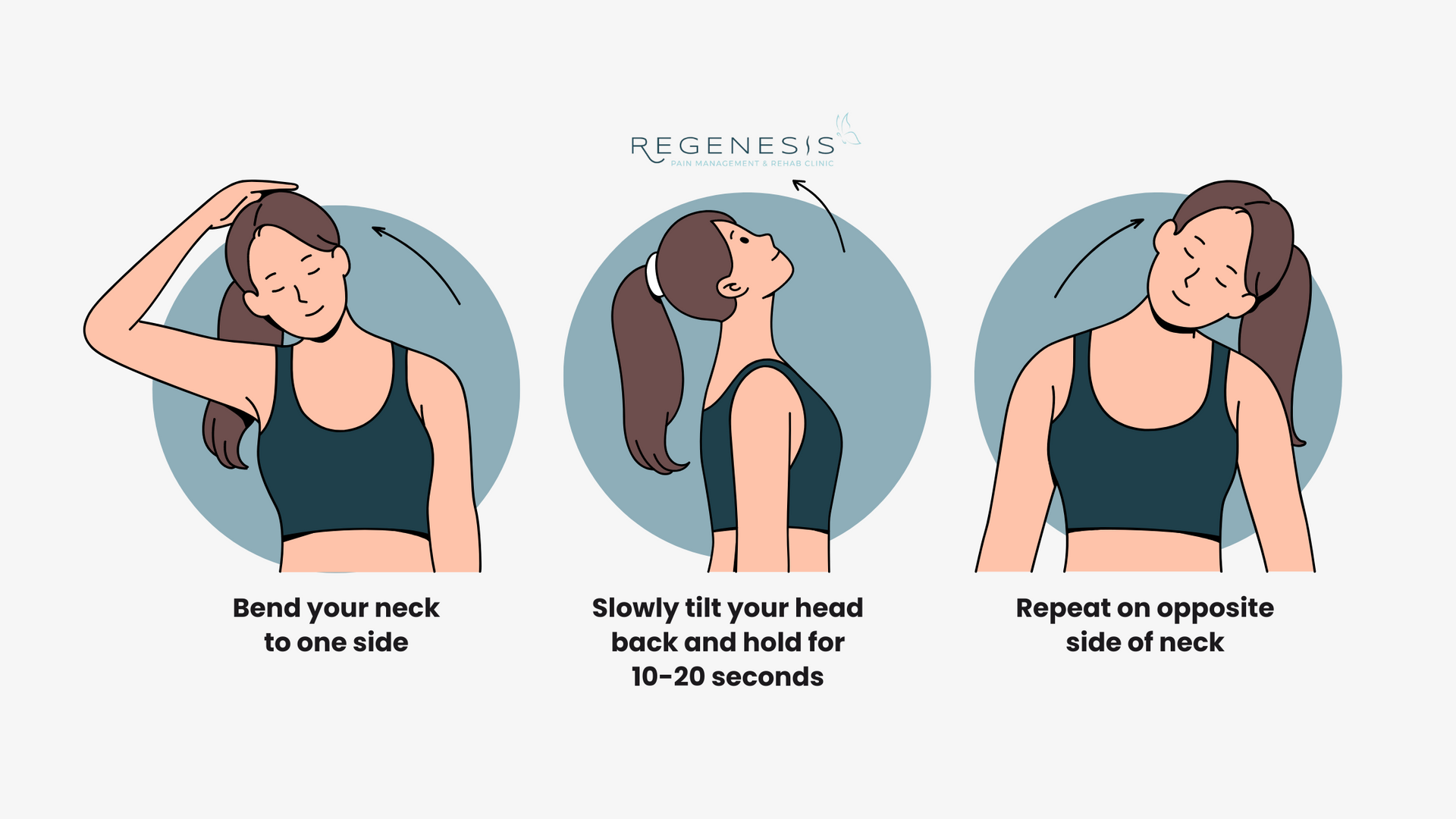
- Neck Stretch: Slowly tilt your head to the right, bringing your ear towards your right shoulder, and hold for 10-15 seconds. Repeat on the left side.
- Scalene Stretch: Place your right hand on the left side of your head and gently pull your head to the right, holding for 10-15 seconds. Repeat on the left side.
- Cat-Cow Stretch: Start on your hands and knees, arching your back and then rounding it, repeating the motion 5-10 times.
- Shoulder Blade Squeeze: Sit or stand with good posture and squeeze your shoulder blades together, holding for 5-10 seconds and repeating 10-15 times.

Posture Correction and Treatment
In addition to these exercises, maintaining proper posture and adjusting your workspace ergonomics can significantly reduce the risks of tech neck. Consider the following tips:
- Place your computer monitor directly in front of you, at a comfortable height, and about 20-25 inches away.
- Adjust your chair to maintain proper posture and ensure your feet are flat on the floor or on a footrest.
- Take regular breaks to stand up, stretch, and move around.
- Consider a standing desk or an adjustable desk to promote better posture.
When to Seek Medical Attention
While simple exercises and self-care measures can alleviate tech neck tightness, there are instances where medical attention is necessary. If you experience any of the following symptoms, seek professional help:
- Severe pain or stiffness in the neck or shoulders
- Limited mobility or numbness in the neck or hands
- Weakness or loss of bladder or bowel control
- Difficulty swallowing or speech
Conclusion
Relieving tech neck tightness is essential to prevent long-term damage to your spine and maintain a pain-free lifestyle. By incorporating exercises, adjusting your workspace ergonomics, and seeking medical attention when necessary, you can effectively manage this condition and live a healthier, happier life.











:max_bytes(150000):strip_icc()/VWH-MiraNorian-IsYourNeckPainRelatedtoYourJawJoint-Standard-0a800b6810cc472a905a482e0f821ada.jpg "Neck Pain: 6 Common Causes and Treatments - Cleveland Clinic")